

“Hosted CRM” means two different things, and the difference decides what you pay. A vendor-hosted CRM (HubSpot, Salesforce, Zoho) runs on the vendor’s servers and bills per user, every month, forever. A self-hosted CRM is open-source software (SuiteCRM, EspoCRM, Twenty, Odoo and others) that you install on your own hosting, so the licence is free and the only recurring cost is the server. This guide covers the second kind: which CRMs are worth running in 2026, what each one needs from a server, which ones run on an ordinary cPanel account versus a VPS, and what the real cost looks like over three years once maintenance time is counted.
With self-hosted CRMs, you can fully own your data, adapt the software to fit your unique requirements, and eliminate reliance on third-party platforms. In this guide, we’ll explore the must-have features of the best self-hosted CRM solutions, highlight the top options available, and provide guidance for choosing the right one for your business.
A self-hosted CRM must do more than just track customer interactions. It should be a robust, secure, and customizable system that aligns with your business goals and scales as you grow. When evaluating self-hosted CRM options, here are the key features to look for:
A CRM hosting with these features will provide a solid foundation for managing and improving customer relationships while adapting to the changing needs of your business.
| CRM | Best For | License | Min Hosting | Ease of Setup | Feature Depth |
|---|---|---|---|---|---|
| SuiteCRM | Enterprise teams needing Salesforce-level features | AGPL (free) | 2GB RAM, PHP/MySQL | Moderate | Deep |
| EspoCRM | Small teams wanting clean UI + quick setup | GPL (free) | 1GB RAM, PHP/MySQL | Easy | Good |
| Twenty | Modern teams, developer-friendly | AGPL (free) | 2GB RAM, Docker | Moderate | Growing |
| Odoo CRM | Businesses needing CRM + ERP in one platform | LGPL (1 app free) | 4GB RAM, Python/PostgreSQL | Complex | Extensive |
| Vtiger | Sales-focused SMBs | AGPL (free)/Paid Cloud | 2GB RAM, PHP/MySQL | Moderate | Good |
| Krayin | Laravel developers wanting customizable CRM | MIT (free) | 1GB RAM, PHP/MySQL | Easy (Laravel) | Moderate |
With many self-hosted CRM options available, it’s important to choose one that matches your business requirements. Here’s a closer look at some of the best self-hosted CRMs on the market today:
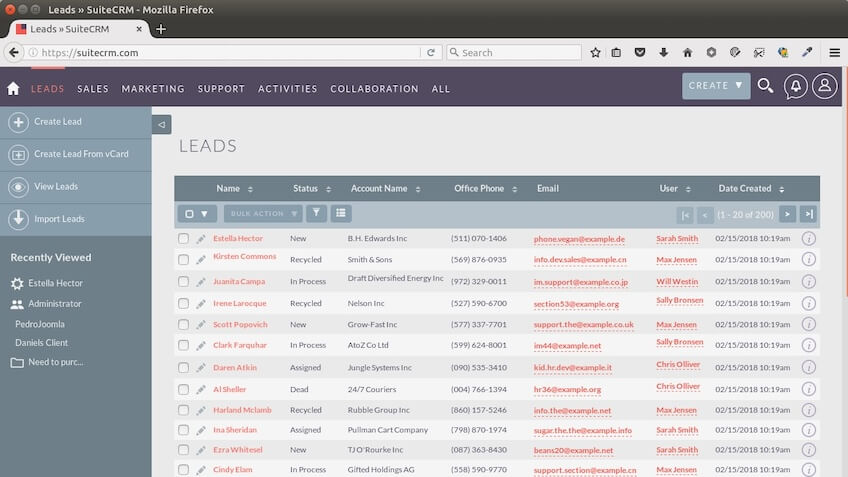
SuiteCRM is one of the most popular open-source CRM hosting platforms, suitable for businesses of all sizes. It offers a wide range of features, including sales automation, advanced reporting, and marketing tools. Its standout feature is its flexibility—businesses can customize nearly every aspect of the software. SuiteCRM is backed by an active community, making it easy to find support and additional resources.
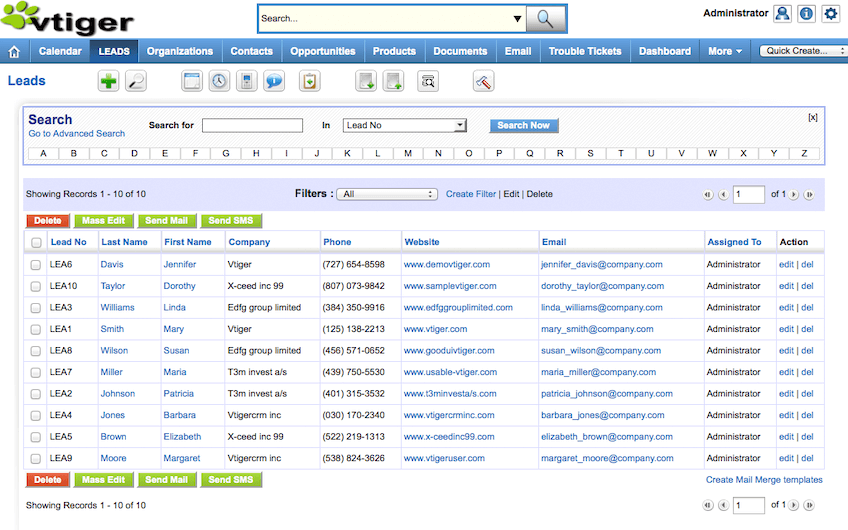
Vtiger combines CRM capabilities with tools for project and inventory management, making it a comprehensive solution for small to medium-sized businesses. It offers automation features, lead tracking, email marketing, and customer support tools. Its all-in-one design simplifies operations for businesses seeking a unified platform for their sales and service teams.
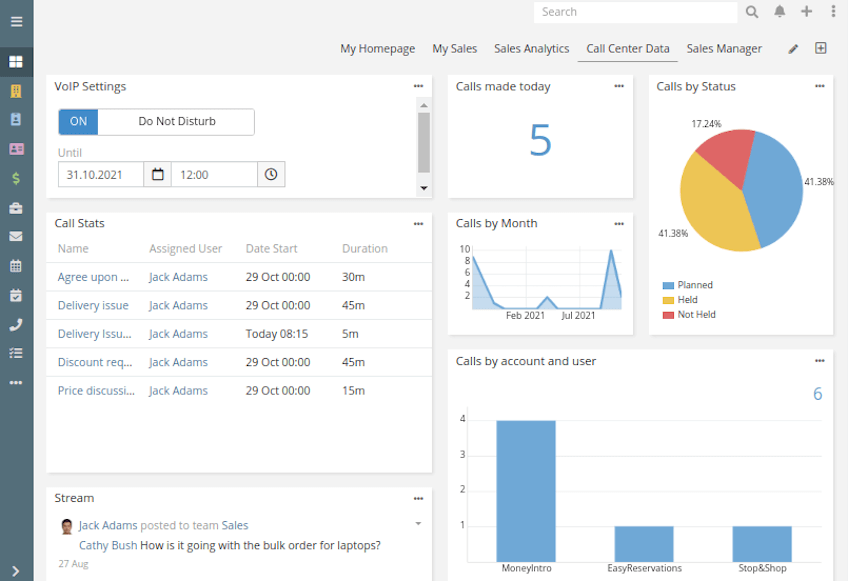
EspoCRM is known for its lightweight and modular design, making it ideal for smaller businesses or startups. Despite its simplicity, it includes powerful tools such as email tracking, lead management, and calendar integration. EspoCRM also allows users to build industry-specific modules, making it highly adaptable for niche markets.
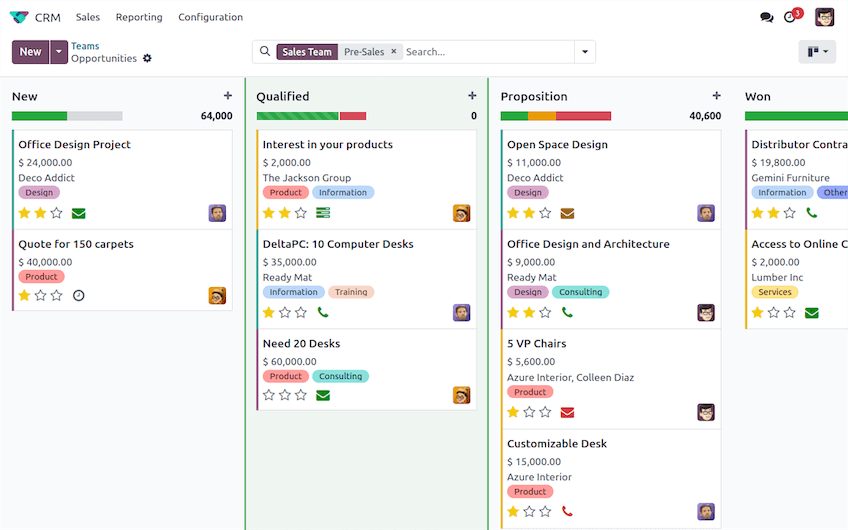
Odoo is a versatile business management suite, with CRM being one of its core modules. Its CRM includes pipeline tracking, customer interaction logs, and advanced analytics. Odoo stands out because of its modular design—businesses can start with the CRM module and expand into other areas like accounting or inventory management as needed.
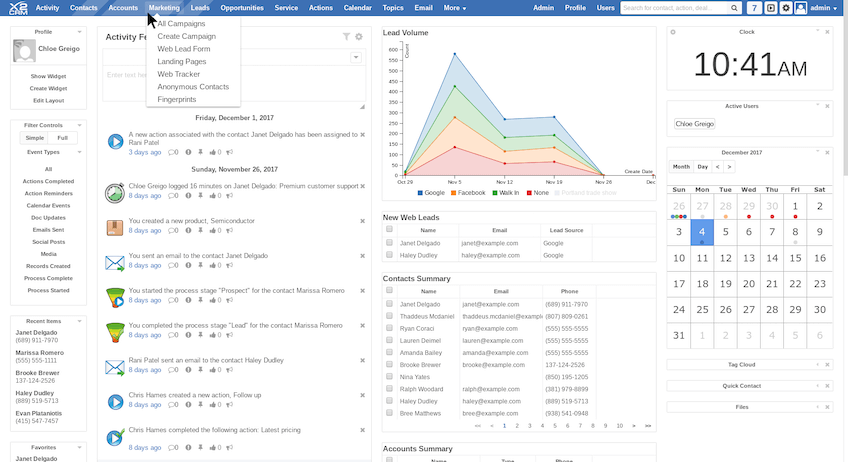
X2CRM is designed for businesses focused on marketing automation, lead scoring, and customer service. It includes tools to streamline sales processes and improve customer engagement through personalized outreach. X2CRM is particularly well-suited for medium-sized enterprises with complex marketing and sales workflows.
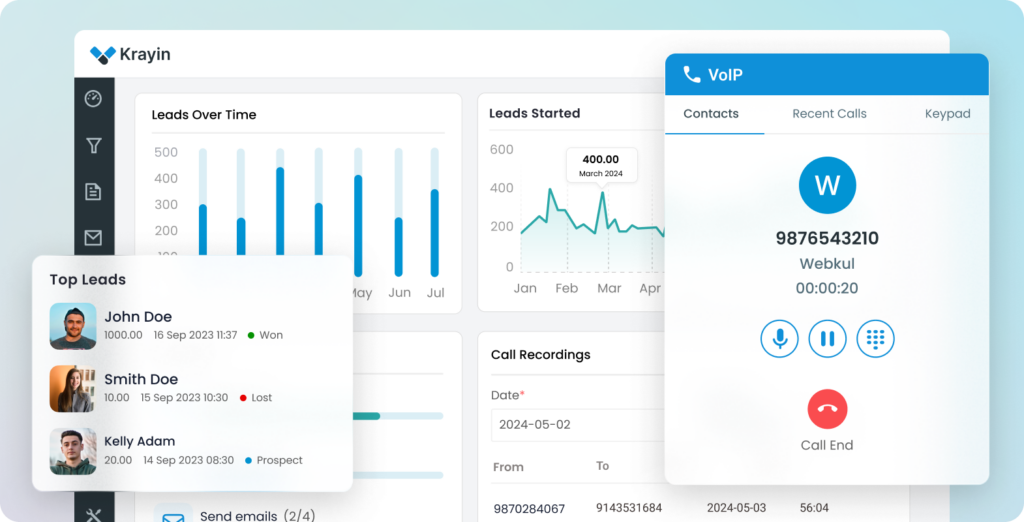
Krayin CRM is an open-source customer relationship management platform designed to help businesses manage leads, customers, sales pipelines, and support workflows from a single interface. Built on Laravel and Vue.js, it offers a flexible and developer-friendly solution for companies looking for a customizable CRM without the limitations of proprietary software.
Each of these CRM hosting solutions has unique strengths, making it essential to evaluate how their features align with your business needs in order to choose the best self-hosted CRM.
The “minimum hosting” column in the overview table hides the decision that matters most: whether the CRM will run on the cPanel shared hosting you may already have, or whether it needs a VPS with root access. PHP-based CRMs install like WordPress; Docker- or Python-based ones do not. Requirements below are the current major releases’ published minimums; plan names and prices are SiteValley’s list prices.
| CRM | Stack | RAM to run it well | Runs on cPanel shared hosting? | SiteValley fit |
|---|---|---|---|---|
| EspoCRM | PHP 8.1+, MySQL 8 / MariaDB | 1–2 GB | Yes — upload, run the installer, done | Pro Hosting ($59.40/yr) for up to ~10 users; Small Business ($8.95/mo) with a dedicated IP for larger teams |
| Krayin | PHP 8.2+ (Laravel), MySQL | 1–2 GB | Yes, with Composer and SSH access | Small Business ($8.95/mo) or Cloud VPS KVM1 ($9.99/mo) |
| SuiteCRM 8 | PHP 8.1+, MySQL / MariaDB, Elasticsearch optional | 2–4 GB | Possible on a well-resourced account, but cron-heavy workflows and reporting are smoother on a VPS | Cloud VPS KVM2 ($19.99/mo, 2 cores, 4 GB promo RAM, 40 GB NVMe) |
| Vtiger Open Source | PHP 8.x, MySQL | 2 GB | Yes for small teams | Small Business plan or Cloud VPS KVM2 |
| Twenty | Docker: Node.js, PostgreSQL, Redis | 2–4 GB | No — needs Docker, so root access | Cloud VPS KVM2 ($19.99/mo) |
| Odoo CRM | Python 3.10+, PostgreSQL | 4–8 GB (more per extra app) | No — Python stack and system packages | Cloud VPS KVM4 ($39.99/mo, 4 cores, 8 GB promo RAM, 80 GB NVMe) |
| X2CRM | PHP 7.x legacy | 2 GB | Technically, but the project is no longer actively released | Not recommended for new installs in 2026 |
If you already pay for a SiteValley cPanel plan, EspoCRM or Krayin can be live this afternoon at no extra cost. Choose the VPS route when the CRM needs Docker or Python, when you expect more than ten concurrent users, or when you want nightly cron jobs, email campaigns and reports to run without touching the limits of a shared account.
Choosing the right self-hosted CRM is a strategic decision that requires careful consideration of your business’s objectives and resources. A well-chosen CRM will become an invaluable asset for managing customer relationships and driving growth. Here are some key factors to consider during your selection process:
Start by identifying the challenges you want the CRM to solve. Are you looking to streamline your sales pipeline, improve customer support, or enhance marketing efforts? Clarifying your objectives will help narrow down your options.
Self-hosted CRMs often have higher upfront costs for licenses, hosting, and setup. However, they eliminate recurring subscription fees, making them a more cost-effective option in the long run.
Create a list of must-have features, such as email marketing integration, advanced reporting, or customer service tools, to ensure the CRM meets your needs.
Ensure your team has the skills to install, configure, and maintain the CRM. If not, you may need to budget for external support or choose a simpler solution.
Choose a CRM that can grow with your business. Modular solutions like Odoo allow you to add functionalities as your needs evolve.
Taking the time to evaluate these factors will ensure that the CRM hosting you choose aligns with your goals and resources.
Self-hosted CRMs offer businesses significant advantages in terms of customization and control. However, they also come with some challenges that need to be considered. Below, we outline both the benefits and drawbacks to help you make an informed decision.
The benefits of self-hosted CRMs are particularly attractive for businesses looking to take full control of their data and operations:
Despite their strengths, self-hosted CRMs have some drawbacks that may impact businesses without sufficient technical or financial resources:
Weighing these pros and cons carefully will help you decide if a self-hosted CRM aligns with your business’s needs and capabilities.
Implementing a self-hosted CRM successfully requires not only the right software but also the right hosting environment. Proper planning ensures your CRM runs smoothly and securely. Here are some tips for getting started:
By focusing on these elements, you can build a reliable foundation for your CRM and avoid potential pitfalls.
Solo to 5 users, want something running fast: EspoCRM. Clean interface, excellent documentation, installs on basic shared hosting. You’ll be up and running in under an hour.
5-50 users, need Salesforce-grade features without the price: SuiteCRM. It’s the most feature-complete open-source CRM — contacts, pipelines, workflows, reporting, email campaigns, case management. The interface isn’t as polished as modern SaaS CRMs, but the functionality is comprehensive.
Developer team wanting a modern CRM: Twenty. It’s the newest player, built with a modern tech stack (React + Node.js), and it’s the most customizable via its API. Still maturing — use it if you’re comfortable with a platform that ships updates frequently and occasionally breaks things.
Small business that wants a short, opinionated list: see our companion guide to self-hosted CRM software for small business, which goes deeper on the lightweight options.
Business that needs CRM + invoicing + inventory + more: Odoo. It’s not just a CRM — it’s a full ERP suite. The CRM module alone competes with dedicated CRM tools, and the integration with Odoo’s accounting, inventory, and HR modules means one platform handles operations that would otherwise require 4-5 separate SaaS subscriptions.
The licence is free; the ownership is not. Here is what a self-hosted CRM actually costs over three years for a ten-person sales team on a SiteValley Cloud VPS, next to the same team on a $25-per-user vendor-hosted plan.
| Cost line | Year 1 | Years 2–3 (each) | 3-year total | Notes |
|---|---|---|---|---|
| Hosting (Cloud VPS KVM2, $19.99/mo) | $240 | $240 | $720 | KVM4 at $39.99/mo if you choose Odoo: $1,440 over three years |
| Domain and SSL | $12 (.com) / free | $12 / free | $36 | Let’s Encrypt SSL is included with the plan |
| Initial setup and data import | 4–8 hours | — | 4–8 hours | One-off; longer if you migrate years of history from another CRM |
| Updates, backups and monitoring | 1–2 hours/month | 1–2 hours/month | 36–72 hours | Minor releases monthly, major upgrades once or twice a year; the VPS includes daily backups |
| Customisation and integrations | Optional | Optional | $0–$2,000+ | Free if you configure it yourself; a developer day costs $400–$800 |
| Vendor-hosted CRM, 10 users at $25/user/mo | $3,000 | $3,000 | $9,000 | Grows with every seat and every tier upgrade |
The honest reading: for ten users the self-hosted route costs about $750 in cash plus roughly 50–80 hours of someone’s time over three years, against $9,000 for the hosted plan. For a three-person team the hosted plan is only $2,700 over the same period, so self-hosting is worth it mainly when you value data control or expect to grow. The break-even arrives at around five users, and the gap widens with every seat you add.
A self-hosted CRM needs a robust hosting environment to deliver optimal performance. At SiteValley, we provide high-performance solutions like our Cloud VPS hosting plan, which offers scalable resources, excellent uptime, and advanced security features. If you are just starting out, a web hosting plan is enough to run EspoCRM or Krayin.
Whether you’re using SuiteCRM, Odoo, or another solution, our hosting ensures your CRM is always running smoothly. Let SiteValley handle the hosting so you can focus on growing your business and maximizing customer relationships!

Quick Customer care response, accurate and broad assistance, easy to use client area.....
I am very happy with the service. I am with site valley for many years and at the present usimg 2 hosting packages. Their service is excellent and super fast. Thanks & Greatly Appreciated
I've been hosting my websites with Sitevalley for more than 6 years. Very satisfied with the services and reliability they provide, competitive prices, almost no downtime, fast and knowledgeable customer support.
I have been using side valley for a couple of years now and have to say I am very happy with the service they offer.I use many Hosting services but site valley stands out in front. Reliable service, great support.I don't normally leave reviews but felt I wanted to for this service as it has been fantastic
I didn't want to review so soon on into taking out hosting with site valley but I feel obliged because their customer service is outstanding, second to none, every time I had an issue it was sorted immediately. I would highly recommend Site Valley.
I have been with Sitevalley for over a year and it's the best hosting I have EVER used. And I have been through a lot of them.
The support staff are amazing, and it's clear that they have a passion for hosting websites. I've rather enjoyed this webhosting company and it's stability for the price is bar-none, amazing.
My collegue adviced me to use SiteValley as a reliable hosting provider with great prices, professional and fast Customer Service. My experience with SiteValley was exactly the way I was promised.
I have been with SiteValley for many years, and plan to stay with them for many more. Customer support is very responsive and knowledgeable.
SiteValley.com is rated 4.8 / 5 based on 329 Reviews »

© 2001 – 2026 SiteValley.com. All Rights Reserved.
