

You can grant some of the administrative rights in your client area to another person. To do so, please enter Client area > My details > Add New Contact, or follow the link.
There you can find a form to fill in with the contact details of your confidant, and delegate certain rights by ticking the necessary functions. Tick 'Activate Sub-Account', and you provide access to the client area for this person.
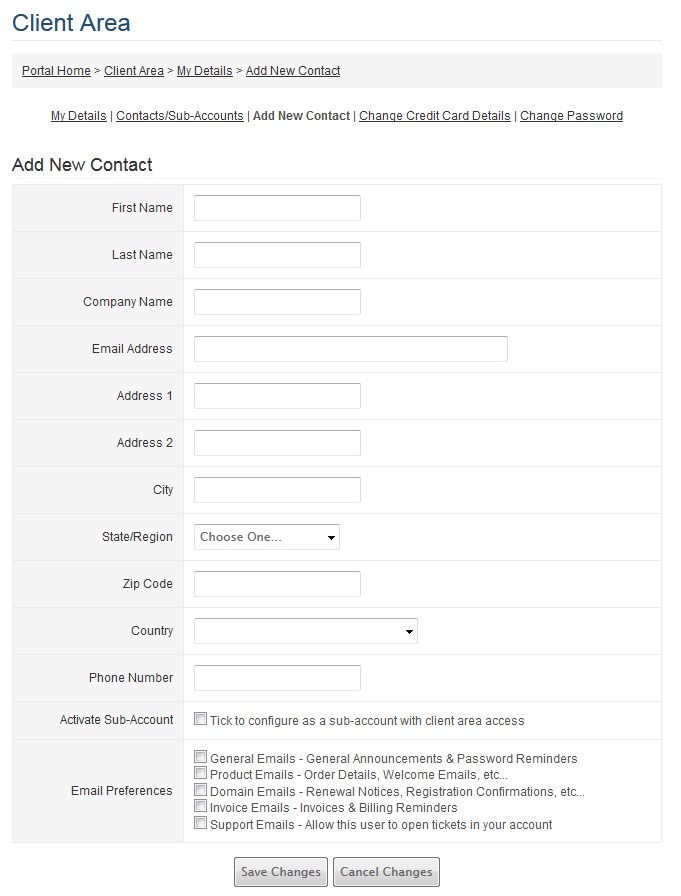
In the end of the form, you can find the Email preferences for a new contact. This way, you ensure that each member of your team has the access to the right client area functions and receives the right email notifications.
If you don't need to provide access to the client area, but just set certain email preferences instead, please save changes without choosing 'Activate Sub-Account' option.
Client area access doesn't presuppose access to your control panel in shared hosting account or to your VPS. Make sure that you provide login details directly to your trusted person, if necessary.
If you have any further questions on the issue, please contact us anytime.