

On our shared hosting carriers MySQL server is not accessible from outside the environment, because such kind of connection is not secure. SSH tunneling here makes a good alternative. It provides encrypted connection between your local machine (PC or laptop) port and the remote database on the hosting.
SSH tunneling on Windows.
- Open SSH client. We usually use Putty. You can download it here.
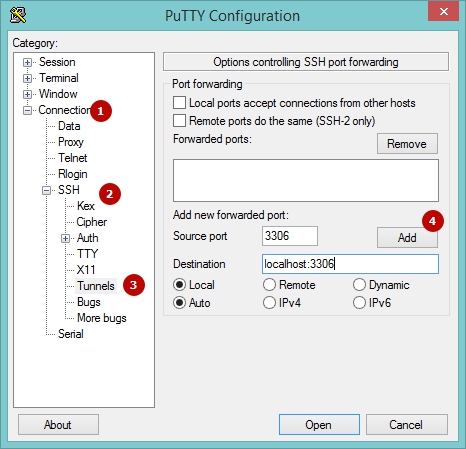
- Go to Connection > SSH > Tunnels
- Enter Source Port (3306 for MySQL) and Destination, which has the syntax domain:port (works well with localhost:3306). Add.
- Open Session and fill Host name field with **shared**.servers.net and Portwith 21098. Replace **shared**.servers.net with the server your hosting account is on. You can find it in the link used to access cPanel, and in our initial New Account Information email.
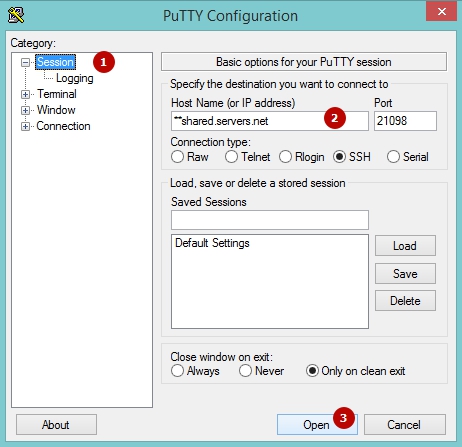
- Save the session, and you won't need to perform the same actions next time.
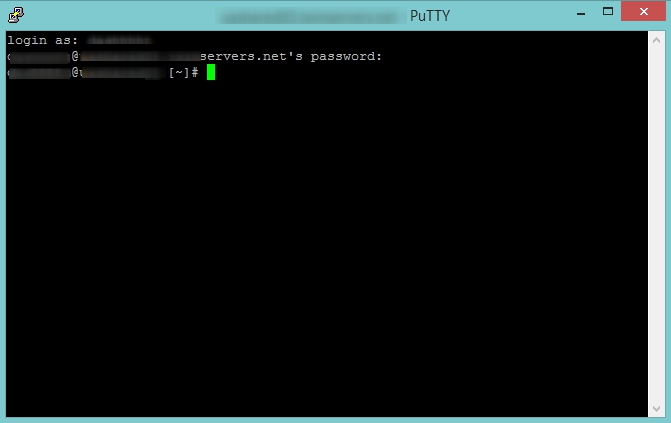
- Once the terminal opens, enter there your cPanel login and password, then press Enter. Ready. Please mind that if you use Putty, the cursor isn't moving while you are entering your password (use right click to paste it btw).
- Now you can connect to MySQL server via your MySQL client. Use localhost as a server and 3306 as a port.
SSH tunneling on MacOS
- Open the Terminal. Use Spotlight to find it (opens with Control and Enter).
- Put one of the following commands depending on which user you are under.
a) it is root:
ssh username@**shared.server.net -L localhost:3306:localhost:3306 -p21098
b) it is not a super-user
ssh username@**shared.server.net -L localhost:13306:localhost:3306 -p21098
Username hereis your cPanel user and **shared.server.net is the name of the server with your cPanel account. You can find it in the link used to access cPanel, and in our initial New Account Information email.
After the connection is established, you can connect to MySQL server via your MySQL client using the created credentials: localhost for a server and 3306 for a port.
Note: If you have ordered a VPS or Linux dedicated hosting, you can set up a direct MySQL connection.