

Artificial intelligence is reshaping the way WordPress websites are created and maintained. WordPress AI plugins are leading this transformation, giving users tools to automate design, content, and optimization in ways that were once only possible for developers. Once a simple CMS for bloggers, WordPress is now an intelligent ecosystem capable of automating design, writing, and optimization tasks that previously required hours of manual effort.
AI’s rise in WordPress is fueled by a few key trends:
This era of automation makes it possible for anyone, from beginners to professionals, to run a sophisticated website with far less effort.

AI plugins act as intelligent assistants within WordPress, capable of learning patterns and adapting to your workflow. By integrating WordPress AI plugins, site owners can bring natural language generation, image synthesis, and smart SEO automation directly into their dashboards. They use machine learning, predictive analytics, and natural language processing to automate tasks like content generation, comment moderation, and keyword optimization.
There are two main categories:
These tools not only save time but enhance decision-making. They analyze user data to make recommendations, such as identifying top-performing topics or optimizing call-to-action placements, helping you create smarter, more engaging websites.

AI plugins deliver tangible advantages that impact both daily workflow and long-term results. Many of these WordPress AI plugins combine multiple technologies, such as machine learning, predictive analytics, and automation, to create highly efficient content workflows.
Instead of writing from scratch, AI can generate articles, meta descriptions, and even structured outlines. It understands tone, adjusts style to match your brand, and ensures readability is optimized for your audience. This allows content teams to focus on creativity rather than repetitive drafting.
Advanced plugins use real-time data to analyze keyword performance, check density, suggest internal links, and improve metadata automatically. The result is faster ranking improvements without manual tweaking.
AI personalizes your site by recommending posts or products based on visitor behavior. For example, a returning customer might see tailored promotions, while a new visitor gets guided recommendations.
Actions such as assigning tags, resizing images, approving comments, or formatting blog posts can be handled automatically. This reduces maintenance time and keeps your site organized without manual oversight.
AI-powered systems can detect unusual login patterns, identify spam in real time, and predict threats using behavioral analysis. This proactive defense minimizes downtime and keeps data safe.
With AI handling repetitive work, you can reduce labor costs, minimize errors, and deliver projects faster, ultimately improving your bottom line.
For most site owners, these plugins quickly become indispensable once integrated into the workflow.

AI tools in WordPress can serve very different purposes depending on what you want to automate or optimize. AI plugins for WordPress make it possible to handle diverse tasks, such as content writing, SEO monitoring, and visual optimization, within a single ecosystem.
When combined thoughtfully, these categories create a self-improving, automated website ecosystem.
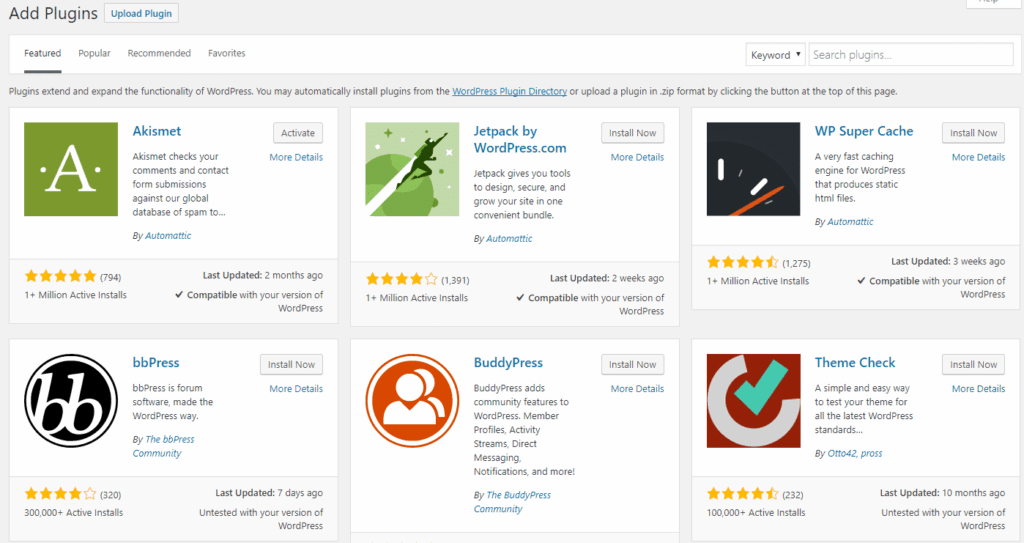
Each AI plugin offers unique benefits depending on your needs. When choosing among various AI plugins for WordPress, it’s essential to match features to your workflow, as some excel in SEO automation while others focus on creative writing or design. Below are the top contenders in today’s WordPress ecosystem.
Integrated directly into the block editor, this tool generates full posts, rewrites paragraphs, and summarizes long content. It functions almost like an AI article publisher WordPress plugin, capable of drafting, structuring, and refining posts from minimal input. It’s ideal for creators looking to publish consistently without sacrificing quality.
Goes beyond traditional SEO tools. It analyzes your topic, suggests focus keywords, improves structure, and ensures every post follows Google’s best practices for visibility and performance.
Designed for marketers and eCommerce stores, Bertha produces engaging copy for landing pages, ad campaigns, and product descriptions. It offers tone customization and is fully integrated into WordPress editors.
A flexible plugin supporting OpenAI-based text generation, chatbot creation, and image generation. Developers appreciate its customizability, while casual users love its simple interface.
This plugin builds entire websites automatically. By analyzing your business type and industry, it generates tailored layouts, design elements, and content within minutes.
The gold standard for spam protection. Using machine learning, it filters out malicious or irrelevant comments, protecting your site’s credibility and improving user trust.
Each of these plugins adds specific value, and combining multiple ones, such as Rank Math for SEO with Jetpack AI for content, creates a balanced AI-powered environment.
Choosing the right AI WordPress plugins depends on your workflow, goals, and level of technical experience, ensuring the tools you select genuinely support your content and automation needs.
Testing different plugins on a staging site is the best way to determine which combination delivers maximum performance without compromising speed or stability.
Once installed, AI WordPress plugins should be treated as creative partners rather than replacements, assisting in writing, design, and optimization while preserving your site’s authentic style. Their full potential comes from proper use and customization.
Adjust AI prompts and training data to produce content aligned with your brand’s tone. Most tools allow you to save writing styles or SEO templates for consistency.
Use tools that complement each other rather than overlap. For example, pair a content generator with a plugin that optimizes SEO or readability.
While AI is powerful, it can occasionally produce factual or stylistic errors. Human review ensures credibility and aligns the tone with your brand voice.
Use analytics to measure how AI-generated content performs in traffic, bounce rate, or conversions. Adjust based on the data rather than assumptions.
AI technology evolves quickly, and plugin updates often include major improvements in performance or accuracy. Regular updates ensure long-term reliability.
Mastering these techniques ensures your AI integration improves productivity without compromising authenticity.
The integration of AI into WordPress is still in its early stages, but rapid development suggests an exciting future ahead.
WordPress’s evolution with AI points toward a future where websites essentially “run themselves,” continually improving performance and engagement with minimal intervention.
WordPress AI plugins are redefining the platform by merging creativity with intelligent automation, reshaping how users approach content creation and site management. They enable website owners to:
By adopting AI tools, you’re not just making WordPress easier to manage, you’re future-proofing your digital presence. Using an AI article publisher WordPress plugin can take this even further, turning your website into a self-sustaining publishing system that keeps producing optimized, relevant content automatically.
At SiteValley, we deliver hosting built for performance, stability, and speed, which is perfect for running advanced AI plugins on WordPress. Our KVM2-US plan provides 2 CPU cores, 4 GB DDR5 RAM, 40 GB NVMe SSD storage, and unmetered bandwidth, giving you the power and flexibility your WordPress site needs to handle AI workloads efficiently. With SiteValley, you get a secure, high-speed foundation designed to keep your website running fast, reliable, and ready for anything.

Quick Customer care response, accurate and broad assistance, easy to use client area.....
I am very happy with the service. I am with site valley for many years and at the present usimg 2 hosting packages. Their service is excellent and super fast. Thanks & Greatly Appreciated
I've been hosting my websites with Sitevalley for more than 6 years. Very satisfied with the services and reliability they provide, competitive prices, almost no downtime, fast and knowledgeable customer support.
I have been using side valley for a couple of years now and have to say I am very happy with the service they offer.I use many Hosting services but site valley stands out in front. Reliable service, great support.I don't normally leave reviews but felt I wanted to for this service as it has been fantastic
I didn't want to review so soon on into taking out hosting with site valley but I feel obliged because their customer service is outstanding, second to none, every time I had an issue it was sorted immediately. I would highly recommend Site Valley.
I have been with Sitevalley for over a year and it's the best hosting I have EVER used. And I have been through a lot of them.
The support staff are amazing, and it's clear that they have a passion for hosting websites. I've rather enjoyed this webhosting company and it's stability for the price is bar-none, amazing.
My collegue adviced me to use SiteValley as a reliable hosting provider with great prices, professional and fast Customer Service. My experience with SiteValley was exactly the way I was promised.
I have been with SiteValley for many years, and plan to stay with them for many more. Customer support is very responsive and knowledgeable.
SiteValley.com is rated 4.8 / 5 based on 329 Reviews »

© 2001 – 2026 SiteValley.com. All Rights Reserved.
