

Restaurants thrive on atmosphere, service, and food, but in today’s digital age, a large portion of your first impression happens online. Diners often look up a restaurant before visiting, checking the menu, reviews, and even photos of dishes. For many owners, figuring out how to create a restaurant website is the first step toward making a strong digital impression. Without a strong website, you risk losing customers to competitors who are easier to find and engage with online. A professional website not only draws in new diners but also builds trust, showcases your brand, and allows for seamless reservations or online orders. This guide will walk you through everything you need to know about how to make a restaurant website that attracts visitors and converts them into loyal customers.
Before you start designing, clarify what you want your website to achieve. If your goal is to fill tables, then online reservations should be your priority. If you offer delivery, an easy-to-use ordering system will be key. Some restaurants may simply want to showcase their atmosphere, menu, and story to strengthen their reputation.
Your target audience also shapes the site. For example, a trendy coffee shop may focus on visuals and social media integration to appeal to younger customers, while a fine-dining restaurant catering to travelers may emphasize reviews, professional photography, and reservation systems. Understanding these needs upfront will guide your design, features, and content, ensuring the site serves both your business and your customers effectively. Knowing how to make a restaurant website that aligns with your goals means tailoring its features to both the dining experience you want to highlight and the audience you want to attract.

The platform you select will dictate how much flexibility and control you have, and it’s a key decision in learning how to make a restaurant website that’s both functional and future-proof.
Whatever option you choose, prioritize mobile responsiveness. The majority of diners will find your restaurant while searching on their phones, and a clunky or hard-to-navigate site can quickly drive them away.
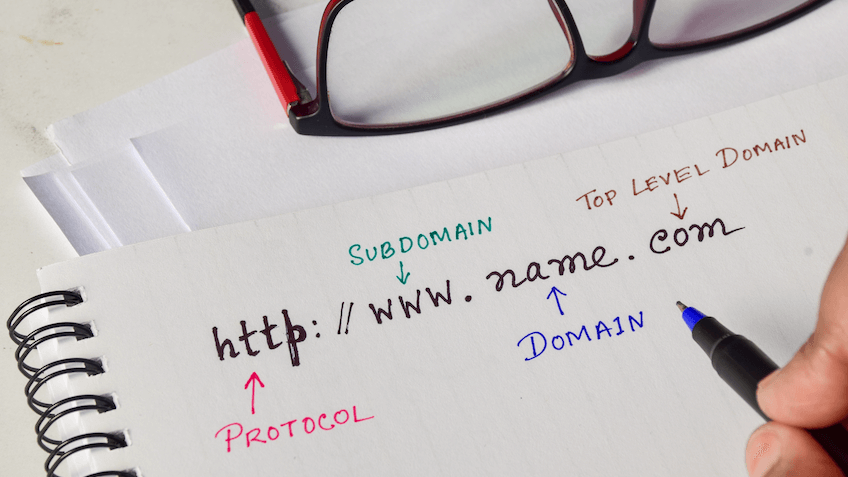
Your domain name should be short, memorable, and ideally match your restaurant’s name. If the exact name isn’t available, adding your city or cuisine type can sometimes help.
Hosting is the backbone of your website. Cheap hosting might save money upfront but can result in downtime and slow loading speeds, which are two things that frustrate potential customers. Restaurants benefit from reliable hosting with strong uptime guarantees and fast performance, as a slow site can lead to abandoned visits.
An SSL certificate is also essential. Beyond securing customer data during reservations or online orders, it signals professionalism. Browsers label unsecured websites as “Not Secure,” which can turn diners away before they even view your menu.
A restaurant website must do more than look good. It should deliver functionality that makes a diner’s journey effortless.
Digital menus should be readable, updated regularly, and mobile-friendly. Avoid uploading menus as PDFs, which are hard to navigate on mobile devices. Instead, create interactive menus with descriptions and enticing photos.
Integrate with systems like OpenTable or Resy, or add a plugin that allows booking directly from the website. This reduces friction for customers and keeps tables full.
Whether you use a third-party app like Uber Eats or build direct ordering into your site, make sure the process is smooth and secure. Direct ordering can help you save on third-party commissions. However, keep in mind that direct ordering also requires more setup, such as payment gateways, security measures, and order management systems, which can add extra responsibility compared to simply linking to third-party apps.
Include a dedicated page with your phone number, email, and an embedded Google Map for directions. Many customers will visit your website primarily to find this information, so make it visible on the homepage as well.
Tell your story. Share how the restaurant started, what makes it special, and the philosophy behind your menu. People connect with stories, and this helps your brand stand out.
High-quality photos of food, drinks, and the restaurant interior give potential diners a taste of what to expect. Consider hiring a professional photographer for best results.
Featuring positive reviews helps establish trust. You can pull these from Google, Yelp, or TripAdvisor, or ask for testimonials directly.
Clearly state when you’re open. This is often the first thing customers check, and incorrect or missing hours can lead to frustration.

When you design a restaurant website, it should visually represent the dining experience. A rustic bistro might use warm tones and handwritten-style fonts, while a modern sushi bar could use clean lines and minimalist design. Branding extends to color schemes, typography, and even the tone of your written content.
Photography is especially crucial in restaurant website design. A single image of a well-presented dish can persuade someone to book a table more effectively than any description. Lighting, composition, and consistency matter, so if possible, invest in a professional food photographer.
Consistency across platforms reinforces brand identity. The design of your website should align with your printed menus, signage, and social media presence, ensuring customers immediately recognize your brand no matter where they find you.
Most restaurant customers come from nearby areas, which makes local SEO essential. Start with keyword research, for example terms like “best sushi in [City]” or “family restaurant near [Neighborhood]” are often searched. Incorporate these naturally into page titles, headings, and descriptions.
Setting up a Google Business Profile is another must. This ensures your restaurant appears on Google Maps and local search results, complete with your hours, location, and reviews. Adding schema markup to your website provides search engines with structured information about your menu, hours, and contact details, improving visibility. For restaurants, using the dedicated Restaurant schema is especially valuable, as it helps search engines display details like cuisine type, reviews, and opening hours directly in results.
Finally, make speed and mobile optimization priorities. Search engines penalize slow-loading sites, and diners are unlikely to wait more than a few seconds before leaving.
A website should do more than display information, as it should actively bring customers back.
Before launch, test your website on multiple devices and browsers. A feature that works on desktop may break on mobile if not designed properly. Walk through the reservation process as a customer would: check that confirmation emails send correctly, payment systems (if applicable) work smoothly, and that navigation is intuitive.
Accessibility testing is also vital. Alt text for images, clear color contrasts, and simple navigation ensure all visitors, including those with disabilities, can use your website without frustration. A strong launch sets the stage for lasting success. Once you know how to create a restaurant website that functions smoothly across devices and browsers, you can launch with confidence and focus on attracting more diners.
Restaurants evolve, and so should their websites. Outdated menus, old promotions, or incorrect hours can create a negative impression and confuse customers. Make updating your website part of your routine, just like refreshing physical menus or décor.
Security updates are equally important. Outdated plugins or CMS versions are vulnerable to hacks, which could compromise customer data or bring your site offline. Regular backups and security checks help safeguard your investment.
Adding fresh content also improves SEO. Blog posts about seasonal ingredients, new menu items, or events at your restaurant keep customers engaged and signal to search engines that your site is active. Refreshing your photo gallery alongside text updates is equally important, for example new images of dishes, events, or décor show customers your restaurant is vibrant and evolving.
Many restaurant website design projects fall into the same traps. Recognizing them early can help you avoid costly redesigns.
Avoiding these mistakes ensures your website looks professional and performs smoothly for every visitor.
When you design a restaurant website, remember it’s often the first interaction a customer has with your brand. By defining goals, choosing the right platform, and integrating key features like menus, reservations, and online ordering, you’ll understand how to make a restaurant website that reflects your personality while meeting customer needs. With ongoing updates and attention to design, your website will remain a powerful marketing and customer engagement tool for years to come.
At SiteValley, we know a restaurant website needs speed, reliability, and simplicity. Our Small Business Shared Hosting with cPanel plan is the ideal choice, giving you unlimited storage and bandwidth to showcase menus, photos, and booking features without limits. With SSL included, daily backups, and one-click installations through cPanel, it provides everything you need to get your restaurant online quickly and securely, while leaving room to grow as your business expands.

Quick Customer care response, accurate and broad assistance, easy to use client area.....
I am very happy with the service. I am with site valley for many years and at the present usimg 2 hosting packages. Their service is excellent and super fast. Thanks & Greatly Appreciated
I've been hosting my websites with Sitevalley for more than 6 years. Very satisfied with the services and reliability they provide, competitive prices, almost no downtime, fast and knowledgeable customer support.
I have been using side valley for a couple of years now and have to say I am very happy with the service they offer.I use many Hosting services but site valley stands out in front. Reliable service, great support.I don't normally leave reviews but felt I wanted to for this service as it has been fantastic
I didn't want to review so soon on into taking out hosting with site valley but I feel obliged because their customer service is outstanding, second to none, every time I had an issue it was sorted immediately. I would highly recommend Site Valley.
I have been with Sitevalley for over a year and it's the best hosting I have EVER used. And I have been through a lot of them.
The support staff are amazing, and it's clear that they have a passion for hosting websites. I've rather enjoyed this webhosting company and it's stability for the price is bar-none, amazing.
My collegue adviced me to use SiteValley as a reliable hosting provider with great prices, professional and fast Customer Service. My experience with SiteValley was exactly the way I was promised.
I have been with SiteValley for many years, and plan to stay with them for many more. Customer support is very responsive and knowledgeable.
SiteValley.com is rated 4.8 / 5 based on 329 Reviews »

© 2001 – 2026 SiteValley.com. All Rights Reserved.
